


TV Repair Problems We Fix
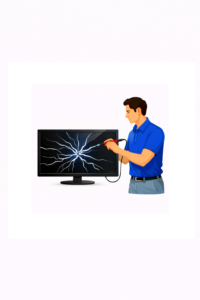 When your TV stops working properly, it is not always easy to know what failed or whether it can be repaired. Many television problems that seem severe are actually caused by a specific failed component, bad backlights, a damaged circuit board, a faulty HDMI port, or another repairable issue.
At 1st Response Electronics, we provide in-home TV repair in Tampa Bay and diagnose many of the most common television problems customers experience. Whether your TV has no picture or sound, a blue tint, lines on the screen, or keeps shutting off, we can evaluate the issue and clearly explain your repair options.
Below are some of the most common TV problems we fix.
1. TV Has Sound but No Picture
This is one of the most common problems we see.
If your TV powers on and you can hear sound, but the screen is dark, the issue is often related to the backlight system. In many LED TVs, the image is still being produced, but the failed backlights prevent you from seeing it. Our LED Guide explains how it all works.
Common causes:
- Failed LED backlights
- Backlight power supply issues
- LED driver circuit failure
- Faults on the power supply board
What you may notice:
- Sound is present but screen is black
- A faint image may be visible with a flashlight
- TV appears to turn on normally
- Screen may flash briefly, then go dark
This type of problem is often repairable and is very common on many LED televisions.
2. TV Has No Power
If your TV will not turn on at all, there may be a failure in the power supply, main board, or another critical circuit.
Common causes:
- Failed power supply board
- Shorted components
- Bad capacitors
- Main board failure
- Internal fuse or standby circuit issues
What you may notice:
- No standby light
- TV clicks but does not turn on
- Standby light blinks repeatedly
- TV is completely dead
A no-power condition does not always mean the TV is beyond repair. In many cases, the issue can be diagnosed and repaired without replacing the television.
3. TV Turns On and Off by Itself
A television that randomly restarts, shuts off, or tries to power on and off repeatedly can have several possible causes.
Common causes:
- Main board failure
- Power supply instability
- Failing backlights triggering shutdown
- Overheating
- Software or control board issues
What you may notice:
- TV restarts on its own
- TV works briefly, then turns off
- Power light flashes during startup
- TV gets stuck in a boot loop
This problem often requires proper diagnosis because several different failures can cause similar symptoms.
4. TV Screen Has a Blue Tint
A blue or purplish picture is another very common issue, especially on LED televisions.
In many cases, this is caused by aging backlights. As the LEDs degrade, their color output changes and the screen can begin to look overly blue, purple, or washed out.
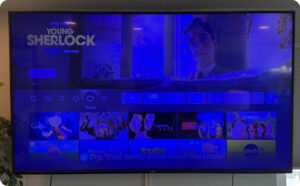 Common causes:
- Worn or discolored LED backlights
- Lens/filter deterioration on LEDs
- Uneven backlight aging
What you may notice:
- Whites look blue
- Skin tones look unnatural
- Picture has a cool or purple tint
- Brightness may look uneven
This issue is often repairable by addressing the backlight system.
5. Dark Spots, Bright Spots, or Uneven Brightness
If your TV has noticeable bright areas, dark patches, or uneven lighting, the backlight system may be failing.
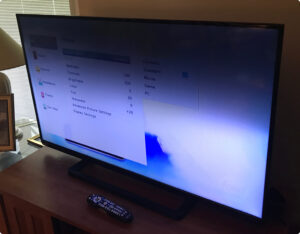 Common causes:
- Failed LED strips
- LED lenses falling off
- Uneven aging of the backlight array
- Diffuser damage
What you may notice:
- Bright spots in parts of the screen
- Dark zones or shadows
- Uneven lighting during bright scenes
- Cloudy or blotchy appearance
These symptoms are especially common in older LED/LCD televisions and can often be corrected depending on the condition of the set.
6. Vertical Lines or Horizontal Lines on the Screen
Lines on the screen can range from a small single line to wide bands that make the TV difficult to watch.
Common causes:
- T-Con board failure
- Panel drive issues
- Loose or damaged ribbon connections
- Main board faults
- In some cases, screen/panel failure
What you may notice:
- Colored vertical lines
- Thin horizontal lines
- Half the screen distorted
- Frozen or duplicated image sections
Some line-related problems are repairable, while others may involve the display panel itself. Proper diagnosis is important before deciding whether repair makes sense.
7. HDMI Ports Not Working
If your TV does not detect your cable box, game console, streaming device, or sound system, the issue may be with the HDMI input or the circuitry connected to it.
Common causes:
- Physically damaged HDMI ports
- Broken solder connections
- Main board input failure
- Surge damage
- Handshake or signal processing faults
What you may notice:
- “No Signal” message
- One HDMI input works, others do not
- Loose HDMI connection
- TV does not recognize connected devices
HDMI port and input-related issues are common, especially in TVs with frequent cable changes or accidental cable strain.
8. No Sound or Distorted Sound
If the picture works but the sound does not, the problem may be with the speakers, main board, amplifier circuit, or audio settings.
Common causes:
- Failed speakers
- Main board audio failure
- Amplifier circuit damage
- Connection issues with external audio devices
What you may notice:
- No sound at all
- Crackling or distorted sound
- Sound cuts in and out
- TV only plays sound through certain inputs
Audio problems can often be isolated and repaired after diagnosis.
9. Burn-In or Image Retention on OLED TVs
OLED TVs can develop image retention or burn-in when static images remain on screen for long periods. Our OLED Burn-In guide explains this.
Common causes:
- Extended display of static logos or tickers
- Repeated gaming HUD elements
- News channels with fixed graphics
- Uneven pixel wear
What you may notice:
- Faint logo visible on blank backgrounds
- Persistent game interface shapes
- News ticker shadows
- Ghost images during certain scenes
OLED burn-in is a different type of problem than standard LED backlight issues. If you have an OLED television, we can help evaluate whether the issue is likely permanent panel wear or another display-related symptom.
10. Cracked or Damaged TV Screen
A cracked screen is usually caused by impact, pressure, or accidental damage.
Common causes:
- Physical impact
- Transport damage
- Pressure on the screen
- Accidental contact during moving or mounting
What you may notice:
- Spiderweb cracks
- Ink-like blotches
- No visible image with broken glass
- Half of screen black or distorted after impact
In most cases, a cracked screen is not economical to repair. However, if you are unsure whether the panel is physically damaged or if another issue is causing the picture failure, we can help identify the problem.
11. Wi-Fi, Smart TV, or App Problems
Some TVs appear to have a hardware issue when the actual problem is related to software, wireless connectivity, or the smart platform.
Common causes:
- Main board issues
- Software glitches
- Network connection problems
- Failed Wi-Fi modules
- Smart platform instability
What you may notice:
- Apps freezing
- TV disconnects from Wi-Fi
- Streaming apps not loading
- TV becomes slow or unresponsive
We can help determine whether the issue is a settings problem, a network problem, or a hardware-related failure.
Why Proper Diagnosis Matters
Many TV symptoms can look similar even when the actual cause is very different.
For example:
A black screen could be caused by backlights, power supply problems, or panel issues
A no-signal issue could be a damaged HDMI port or a connected device problem
Lines on the screen could be a bad board, bad connection, or a failed panel
That is why proper diagnosis is so important. We do not like guessing. We identify the likely cause, explain what we find, and help you decide whether repair is the right option.
In-Home TV Repair in Tampa Bay
We provide in-home TV repair service throughout Tampa Bay and work on many common television problems in the home, where the TV is already installed and connected.
We repair many types of televisions, including:
- LED TVs
- LCD TVs
- OLED TVs
- QLED TVs
- Smart TVs
- 4K and 8K televisions
If your TV is acting up and you are not sure what the issue is, contact 1st Response Electronics. We will help determine the cause of the problem and discuss your options.
FAQ
What is the most common TV problem you repair?
One of the most common issues we see is a TV with sound but no picture, often caused by failed LED backlights.
Can a TV with a black screen be repaired?
Yes, in many cases. A black screen may be caused by failed backlights, a power supply issue, or another repairable fault.
Why does my TV have a blue tint?
A blue or purple tint is often caused by aging or failing LED backlights.
Can HDMI ports on a TV be repaired?
In many cases, yes. Damaged HDMI ports, broken solder connections, and some main board input faults can often be repaired.
Are lines on a TV screen repairable?
Sometimes. Lines can be caused by a board or connection issue, but they can also indicate panel failure. Diagnosis is needed to determine whether repair is practical.
Call 1st Response Electronics for TV Repair
If your television has no picture, no sound, blue tint, lines on the screen, bad HDMI ports, or another common fault, we may be able to help.
1st Response Electronics provides professional TV repair in Tampa Bay, with in-home service for many common problems customers experience every day.
Contact us today to schedule service and find out whether your TV is worth repairing.
